.png)


Key takeaways
- Webflow AEO (Answer Engine Optimization) is the practice of structuring your Webflow site so AI tools can understand, extract, and cite its content.
- SEO helps people find your page. AEO helps AI tools understand what the page is actually saying.
- The four pillars of AEO System: technical foundation, answer-ready content, scalable architecture, and authority signals.
- Clear structure, direct answers, FAQPage schema, internal linking, and visible E-E-A-T signals are the fastest routes to AI citation.
Webflow AEO (Answer Engine Optimization) is the practice of structuring your Webflow site so that AI tools - ChatGPT, Perplexity, Google AI Overviews - can find, understand, and cite your content. Pages that are clear, well-organised, and easy to extract from show up in AI-generated answers. Pages that aren't get ignored, even if they rank well in traditional search.
Traditional SEO was mostly about rankings. AEO focuses on something different: how clearly your content is organised, how easy it is to pull a direct answer from, and how trustworthy your site looks to systems that generate answers rather than list links.
In practice, that means your Webflow site needs more than polished design. It needs clean structure, a strong information hierarchy, direct language, and content that AI systems can interpret and quote with confidence.
What is AEO in Webflow?
Definition: Webflow AEO (Answer Engine Optimization) is the process of structuring a Webflow website so that AI search tools - including ChatGPT, Perplexity, and Google AI Overviews - can understand, extract, and surface its content in generated answers.
Unlike traditional SEO, which focuses on ranking positions, AEO targets visibility in AI-generated summaries, featured snippets, and direct answer boxes. When tools like ChatGPT or Google’s AI Overviews look for information, they tend to favor pages with clean headings, logical structure, semantic markup, and direct, well-organized answers.
AEO also is not a one-time tweak. It sits inside a bigger quality system. Things like clean code, consistent page structure, factual clarity, and overall site trust all influence how likely your content is to be surfaced. The goal is simple: if an AI system is looking for answers in your space, your site should be easy to understand, easy to pull from, and worth citing.
AEO vs SEO: what changes in AI search
AEO is not a replacement for SEO. It is an additional layer on top of it. SEO gives you the foundation: crawlability, speed, internal linking, authority. Without it, your content is already at a disadvantage. What AEO adds is answer-readiness - the ability to get understood, extracted, and cited in AI-generated responses.
In simple terms: SEO helps you get found. AEO helps you get used.
SEO helps pages rank
SEO is still the starting point for visibility. Search engines and AI systems both rely on strong fundamentals to understand what your site is about and whether it deserves attention.
For a Webflow site, that includes the usual essentials: clean URLs, clear heading structure, relevant keywords, solid internal linking, fast load times, and a technically sound setup overall. Technical structuring creates the framework that search engines use crawl your pages and understand how your content fits into a wider topic.
So even in the context of AI search, SEO is not something separate or outdated. It is still the base layer that supports discoverability.
AEO helps pages get understood and surfaced
Where AEO comes in is after that first layer. It is about making your content easier to interpret, easier to extract from, and easier to trust in an answer-driven environment. AI systems parse structured data, semantic relationships, and content hierarchies to determine which pages best answer specific queries, then surface those answers directly in conversational responses.
That usually means clearer structure, stronger definitions, better context, and more direct answers. A page that is optimized for AEO tends to make the main point obvious, support it with useful detail, and remove as much ambiguity as possible. For example, a page might rank for a broad term in search, but in AI search it is more likely to be surfaced when it directly answers a more specific question in a clear and structured way.
Why you now need both
People do not use search in just one way anymore. They move between Google, ChatGPT, Perplexity, and other tools depending on what they need. That means your site must work in both environments. SEO keeps your pages discoverable. AEO ensures AI engines understand and cite your content. Relying on SEO alone is no longer enough for full visibility
The 4 pillars of Webflow AEO
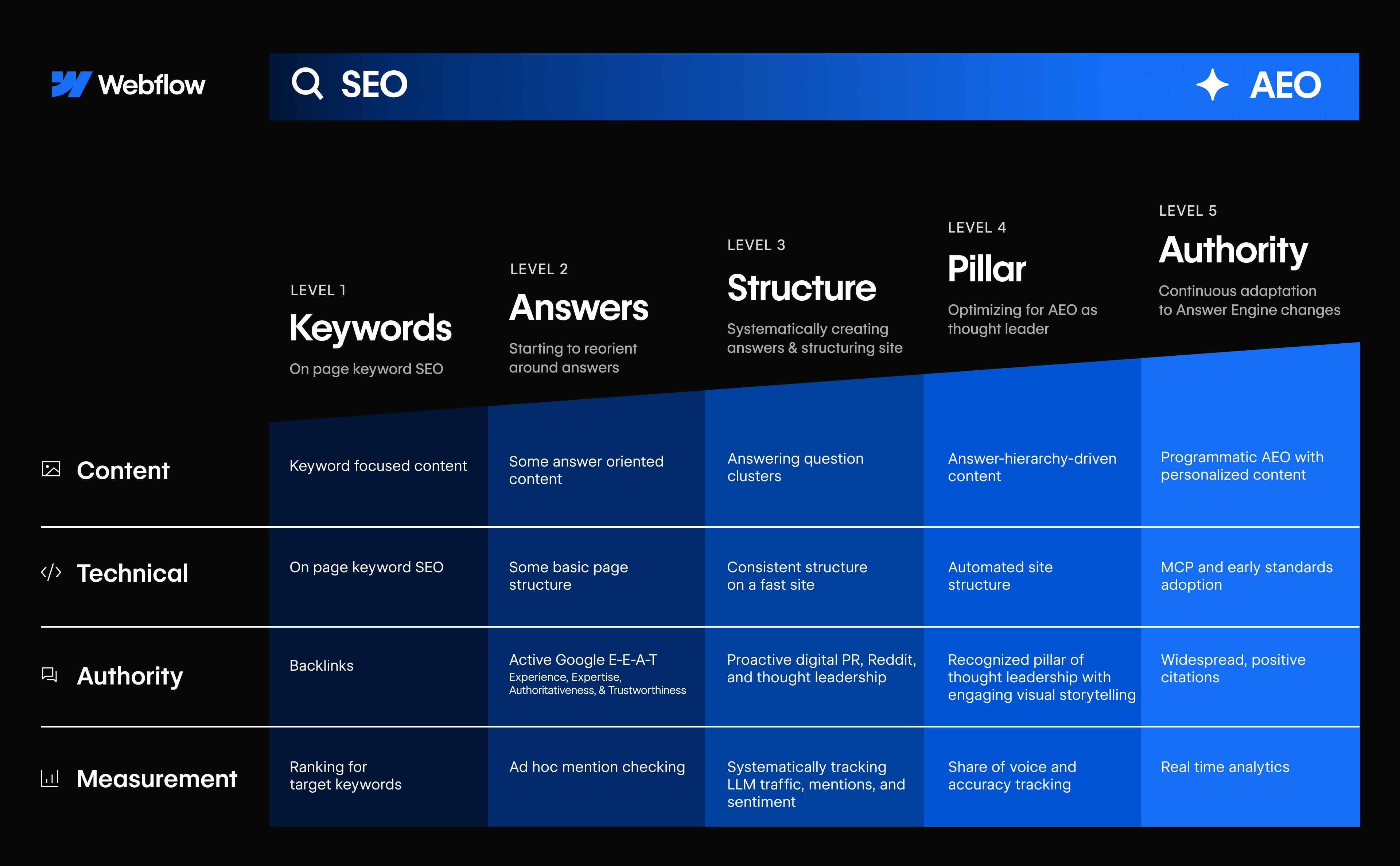
If you want your Webflow site to show up in AI-driven search, you usually need more than one round of fixes. Webflow AEO maturity model rests on four interdependent pillars that address how AI systems discover, evaluate, extract, and trust your content.
A few FAQ blocks on their own will not do much. Schema alone will not do much either. What actually helps is when the whole site starts making more sense - the technical setup is clean, pages answer real questions directly, similar content follows a consistent structure, and there is enough proof for the page to feel credible.
Pillar 1: Technical foundation
AI tools rely even more than traditional search engines on clean structure, fast load times, and content they can easily access. Webflow gives you a strong base of technical AEO foundations: semantic HTML, responsive design, and automatic sitemap generation all help. Where things usually fall apart is in the details:
- Schema needs to be complete and relevant: not added just for the sake of it
- Your robots.txt should explicitly allow AI crawlers: ChatGPT-User, Claude-Web, GoogleOther
- Performance matters: heavy scripts, oversized images, and bloated code make your site less attractive to pull from
- Heading hierarchy must be logical: H1 → H2 → H3 with no skipped levels
- Alt text must be descriptive and useful, not empty or auto-generated
Pillar 2: Answer-ready pages
Once the foundation is in place, each important content page needs to open with a short, clear explanation of the topic. Ideally those first one or two sentences should work as a standalone answer. The inverted pyramid structure: main point first, supporting detail second - is what AI engines are trained to extract from. Structure makes the difference:
- Use subheadings phrased as real questions (e.g. 'What does Webflow AEO actually include?')
- Follow each H2/H3 immediately with a 1–2 sentence direct answer before expanding
- Format processes as numbered steps, not paragraphs
- Add comparison tables, FAQs, and definition boxes wherever they naturally fit
Pillar 3: Scalable site architecture
AI visibility is not just about individual pages - it depends on how clearly your whole site is organized. A messy structure makes it harder for AI systems to understand which topics matter, how pages relate, and where authority sits.
Your homepage should lead into core category or service pages, and those should connect naturally to supporting resources. URLs should be clean and descriptive. Internal links should use descriptive anchor text - a link labeled 'schema implementation guide' tells AI far more than 'read more' ever could. Over time, this creates a strong topical network instead of a collection of isolated pages.
Pillar 4: Authority and E-E-A-T signals
It is not enough to have crawlable pages and good structure if there are no signals showing why your content should be trusted. AI engines are trying to avoid citing weak, generic, unsupported content. That means:
- Named author with visible bio and credentials on the page
- A visible 'last updated' date: freshness is a direct AI citation signal
- External links to primary sources (Google AI documentation, Perplexity, Bing Copilot guidelines)
- At least one real-world example, data point, or case study reference per post
- Consistent proof throughout: if you make a claim, support it
From our work with B2B SaaS teams on Webflow: Pages that added FAQPage schema combined with a named author byline and one concrete client outcome saw measurable improvement in AI citation within 6–8 weeks. Structure alone helps - but structure plus credibility is what gets a page cited by name.
How AI tools read and evaluate Webflow pages
AI tools do not read websites the way people do. They are not getting a feel for the brand or patiently piecing together what you meant. They are looking for structure, clarity, and signals that tell them what the page says and whether it is worth trusting.
They look for structure, clarity, and context
AI systems work best with content that is easy to interpret. That starts with a logical heading hierarchy, clearly organized sections, and formatting that makes content easy to follow. If everything sits in one long wall of text, it is harder to understand what matters. Context matters too: are key terms explained properly? Are examples present? Are related topics connected through internal links? A page with clear structure and helpful context gives AI far more to work with than one that just drops information without logic behind it.
They need pages that are easy to extract from
AEO-friendly pages are usually easy to pull information from. The main point is clear, the wording is direct, and each section does one job well. Think in blocks: one section answers one question. One paragraph explains one idea. Lists, tables, summaries, definitions, and FAQs all make content easier to scan and easier to reuse.
Trust signals matter more than most teams think
AI tools look for signals that validate what they are reading: author information, publication dates, source references, schema markup, testimonials, and proof points. These things may seem small, but together they make a page easier to trust and easier to reference. In AI search, that can make the difference between getting cited and getting skipped.

What makes a Webflow page more visible in AI search
Clear headings and direct answers
One of the strongest signals is structure. AI systems scan pages for sections that look like complete answer units. A heading such as 'What is schema markup?' is far easier to interpret than 'Schema markup overview' because it clearly tells the model what kind of information comes next.
When a clear question-style heading is followed immediately by a direct answer, the content becomes much easier to extract, quote, or summarize. If the real answer is buried several paragraphs down, the page creates more work for the model and loses out to better-structured sources.
FAQPage schema and structured context
Beyond visible copy, AI tools rely on machine-readable signals to understand what a page is about. Schema markup tells systems whether the page is an article, a FAQ, a guide, a product - and who published it.
A Webflow page with properly implemented FAQPage JSON-LD gets its question-answer pairs extracted directly into AI responses. An identical page without that markup gets summarized loosely or skipped entirely. Adding Article schema with datePublished, dateModified, and a named Person author is the second most important schema addition for this post type.
Strong internal linking with descriptive anchors
AI systems do not evaluate pages in isolation. They look at how content connects across the site. Strong internal linking helps establish those relationships - which pages support each other, which topics are central, and whether the site has real depth or just scattered content.
The quality of linking matters. Descriptive anchor text gives context. 'How to implement FAQPage schema in Webflow' tells both readers and AI systems far more than 'learn more' ever could.
Proof, authorship, and credibility
Good structure helps AI understand a page. Credibility helps it trust the page enough to cite it. AI systems favor content that shows who wrote it, why that person or brand is qualified, and what evidence supports the claims. That can come through author names, bios, credentials, case studies, original data, cited sources, or examples with real outcomes.
Fresh, maintained content
A page does not need to be rewritten every month, but it does need to show signs of maintenance. Outdated statistics, broken links, and references to features that no longer exist all weaken trust. AI systems want sources that still reflect reality. If two pages answer the same question equally well, the one that looks current and actively maintained is the safer pick.
Where to start with Webflow AEO: a 5-step checklist
Begin with your highest-value pages rather than attempting site-wide optimization. Trying to optimize everything at once usually spreads effort too thin. Start with the pages closest to revenue or visibility: core service pages, key landing pages, and blog posts that already attract relevant traffic.
- Identify your 5–10 highest-value pages: the ones closest to a business goal: lead generation, sales support, or high-traffic search intent.
- Fix the technical foundation first: check page speed, sitemap health, robots.txt for AI crawlers, heading hierarchy, and metadata before touching content.
- Improve answer structure on existing pages before writing new content: add TL;DR boxes, rewrite vague headings as questions, bring direct answers to the top of each section.
- Add FAQPage and Article JSON-LD schema: this is the single highest-impact technical change for AI citation. Implement via a Webflow custom code embed or global site script.
- Build topic clusters, not isolated pages: one pillar page per core topic, surrounded by supporting posts that link back to it. Connect everything with descriptive internal links.
Note on measurement: AEO results do not show up in traditional keyword rankings. Track AI citations, referral traffic from ChatGPT/Perplexity, and prompt visibility by testing your target queries directly in AI tools. Improvements typically become visible over 4-8 weeks, not days.
If you know what AEO is and want to go deeper, here's where to go next:
- Webflow AEO content: how to write answer-first pages - Structuring content so AI tools can extract and cite it
- Webflow Technical AEO: how to structure your site for AI search - Schema, crawlability, CMS architecture, and performance
- AEO authority for Webflow: how to build trust in AI search - E-E-A-T, third-party mentions, and citation credibility
- How to measure Webflow AEO - AI referral traffic, citations, prompt visibility, conversions
- Webflow's new AEO tool - What the built-in AEO feature does and how to use it
- Why most B2B sites aren't ready for AI discovery - The gaps most B2B teams miss before they start
Why Webflow is a strong foundation for AEO
Webflow gives you a strong starting point. Clean HTML output, control over metadata, automatic sitemaps, and solid hosting without patching together plugins - these matter because AI tools, like search engines, work better with sites that are structurally clean and easy to read.
But Webflow alone will not make a site visible in AI search. You still need deliberate choices about how pages are built and how information is presented. The platform gives you flexibility through the CMS, but that only helps if you use it consistently. The real advantage is that Webflow removes a lot of technical friction - which makes it easier to implement AEO improvements quickly and keep things consistent at scale.
What Webflow already does well
- Cleaner technical base than plugin-heavy CMS platforms
- Easy metadata control at the page and CMS collection level
- Automatic sitemap generation that keeps AI crawlers informed
- CMS collections enable repeatable, consistently structured page types
- Semantic HTML output with logical element hierarchy
The three most common AEO gaps on Webflow sites
- Internal linking: pages often sit in isolation without connection to related topics
- Performance: interactions, embeds, and oversized images slow pages down and reduce crawl priority
- Schema markup: either missing entirely or added only at a basic level without FAQPage or Article types
And then there is the content itself. Even a technically solid page can be too vague or too hard to extract from if the structure is weak. The real difference is not just using Webflow - it is using Webflow intentionally.
Final thoughts: structure wins visibility
Webflow gives you a strong starting point. Clean markup, semantic HTML, solid performance, and flexible CMS structures make it easier to build pages AI systems can crawl and interpret.
But visibility comes from turning that technical foundation into content that is easy to extract, easy to trust, and easy to connect across the site. That means clear answers, strong page structure, helpful internal linking, credible proof points, and content that stays current. If you are starting from scratch, keep it simple:
- Start with one high-value topic cluster
- Turn key pages into clear, answer-first resources
- Add FAQPage and Article schema immediately
- Strengthen credibility with authorship, proof, and internal links
- Track AI visibility over time and improve what gets picked up
The sites that perform best in AI search are not always the biggest or the most complex. More often, they are the ones that make their expertise easiest to understand and easiest to trust.
If you want a second pair of eyes on your current setup, we're happy to take a look. Get a scoping call.